
Back to The Lab

How Much Should I Spend When Starting Google Ads?

Photo of Mathew Walters
Mathew Walters
Paid Marketing

When jumping into Google Ads, one of the primary questions you'll face is: How much should I spend? The answer isn't one-size-fits-all. It varies based on multiple factors, including your specific business circumstances and industry norms. Here's a detailed guide to help you determine an optimal starting budget for your Google Ads campaigns.

Identify Your PPC Goals

First, clearly define what you aim to achieve with your PPC campaigns. Common goals include:

  • Lead Generation: Capturing potential customer information for future follow-ups.

  • Sales: Driving immediate purchases of your products or services.

  • Brand Awareness: Increasing the visibility of your brand to a broader audience.

For this guide, we'll focus on lead generation, typically executed through the Search Network.

Determine Your Click Goals

Decide how many website visitors you want to attract daily. For example, if your target is 30 new visitors per day, you'll need to conduct keyword research to understand the average cost-per-click (CPC) for your targeted terms. This will help you estimate the daily and monthly budget required to achieve your goal.

Google keywords planner

Conduct Keyword research

Keyword research is crucial for budgeting and targeting efficiency. Here's how to approach it:

  1. Use Google Ads Keyword Planner: When conducting keyword research for specific regions, ensure you select the region you will be targeting to get relevant data. Regional targeting can significantly impact keyword performance and costs.

  2. Select Keywords Wisely: Avoid broad terms with high search volumes, especially if you have a limited budget. These terms often come with high CPCs and can deplete your budget quickly.

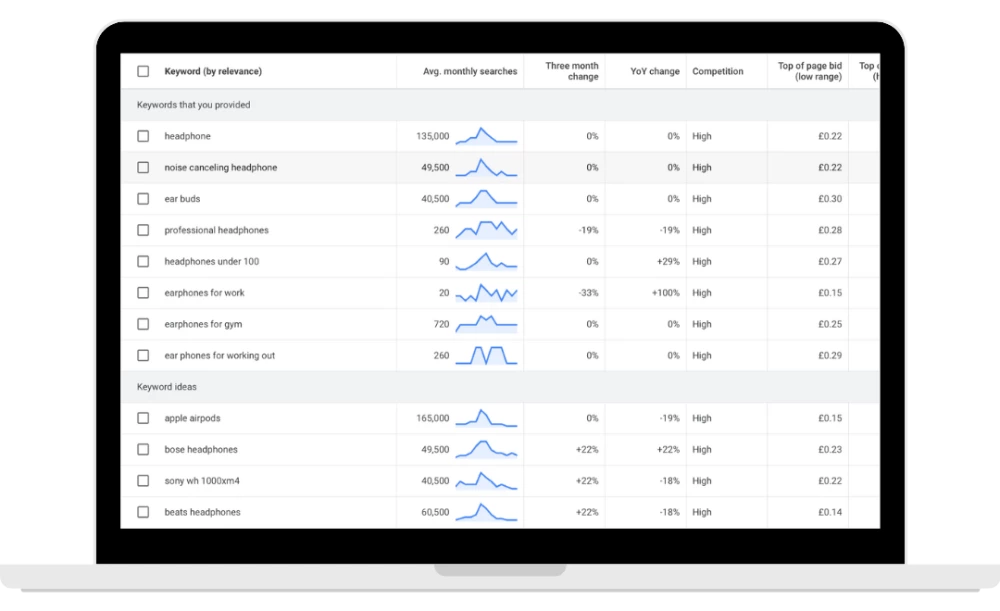
For example, targeting the keyword "headphones" with 135k monthly searches might not be cost-effective. Instead, consider more specific terms like "headphones under £100" or "earphones for gym." These targeted keywords reduce the chance of wasted spend and ensure your ads are seen by users with a higher intent to purchase.

Avoid Common Mistakes

Start with a Focused Keyword List: Begin with 5 to 10 key terms. Don't be tempted to target too many keywords at once. As you gather data and optimise your campaigns, you can gradually expand your keyword list.

By having a focused list of 5 to 10 keywords, you can still reach a large audience by utilising different match types (broad, phrase, exact). This approach allows your ads to show for multiple keyword variations without spreading your budget too thin.

Google Ads spending dashboard

Example of Keyword Strategy

In the image to the right, the term "headphone" has 135k monthly searches. Targeting this term could lead to high costs and low ad positions, wasting your budget quickly. Instead, more specific keywords like "headphones under £100" or "earphones for gym" allow for better targeting and budget efficiency, helping you reach your ideal customers more effectively.

For more information on conducting keyword research, including advanced techniques, filters, and optimal keyword selection, check out our video on how to conduct keyword research.

Calculate Your Cost

Once you've identified how many clicks you want to drive to your website, determined your click goals, and conducted the necessary keyword research, you will have a list of keywords and data to determine your spending.

To calculate your cost:

  1. Take the top-of-page and bottom-of-page click costs for your selected keywords.

  2. Determine the average CPC from these values.

  3. Multiply this average CPC by the number of clicks you want.

For example, if your average click cost is £0.73 and you want to achieve 30 clicks per day, the calculation would be: 

£0.73 × 30 = £21.90 per day

To work out your monthly cost based on a 30-day month: 

£21.90 × 30 = £657 per month

This calculation helps you set a realistic budget to achieve your click goals.

take note

Starting with Google Ads requires a strategic approach to budgeting and keyword selection. By defining your goals, conducting thorough keyword research, and avoiding common pitfalls, you can create a cost-effective campaign that drives meaningful results. Remember, start small, optimise continuously, and expand your efforts as you gather more data and insights.